 Website



hreflang setup
Hreflang Setup: Tags, x-default and Testing Guide
Set up hreflang step by step: language and region codes, self-references, return links, x-default and how to test it, for sites and apps you build with AI.
Hreflang setup comes down to one job: on every language or regional version of a page, list all the versions, including the page itself, with a valid code and a full URL. Add one x-default entry for everyone else. Then check that every page points back to every other page. That is the whole system. Many failures come from one broken link in that chain.
This guide is for people who build sites and apps with an AI assistant and now need them to work in more than one language or country. On WebsitePublisher, the AI web platform, your assistant (ChatGPT, Claude, Gemini, Grok and others) builds and publishes websites and apps through the WebsitePublisher connector, so you can ask for the tags in plain language and check the result on the live page.
TL;DR
- Hreflang tells Google which pages are alternate language or regional versions of each other, so Search can show the right URL to the right user.
- Every version lists itself and all its alternates, and every alternate links back. Missing return links are a common error.
- Use an ISO 639-1 language code, optionally plus an ISO 3166-1 Alpha 2 region code (
en-GB). A region alone is invalid. URLs must be fully qualified. - Add
x-defaultfor users whose language or region you do not cover, such as a language selector page. - Pick one method (HTML head, HTTP header or XML sitemap), then test the live pages and the return links.
Table of Contents
- What hreflang does and when you need it
- Before you add a tag: get the URL structure right
- The rules for codes and URLs
- Three ways to add hreflang tags
- Self-references and return links
- How to set up x-default
- Worked example: a freelancer with a three-version portfolio
- Testing your hreflang setup
- Common mistakes and quick fixes
- Build hreflang pages and tags in one place
- Our perspective
- FAQ
- Sources
What hreflang does and when you need it
Hreflang is an annotation that identifies alternate language or region-specific versions of a page. According to Google Search Central, it helps Search pick a more appropriate URL for the user. You use it for translated pages, or for similar content adapted for different regions.
Two typical cases:
- Same content, different languages. Your portfolio exists in English and German.
- Same language, different regions. Your store has one page for US visitors and one for UK visitors, with different currency, shipping and spelling. Yoast’s guide describes both uses and notes the versions can live on different domains.
You do not need hreflang for a site in one language aimed at one audience.
Two expectations to set. First, hreflang is a hint, not a command. Search Engine Land’s guide notes that canonicalization, site structure, content similarity and indexation can all affect which version appears. Second, hreflang does not translate anything. You still need real, separate pages for each version. If you are planning those pages, our guide to multilingual AI websites covers how to build and translate them.
Before you add a tag: get the URL structure right
Hreflang only works when each language version has its own URL. Google’s multi-regional documentation recommends separate URLs per language rather than switching content by cookies or browser settings, because dynamic switching can make variants hard for Googlebot to discover. The same page warns against automatically redirecting users based on their presumed language, since that can keep both users and search engines from seeing every version.
A clean structure looks like this:
| Version | URL pattern |
|---|---|
| English (US) | https://example.com/en-us/ |
| English (UK) | https://example.com/en-gb/ |
| German | https://example.com/de/ |
| Selector / fallback | https://example.com/ |
Subfolders, subdomains and separate domains all work. Pick the one you can maintain. For small sites and apps, subfolders keep everything under one domain and one project.
If you are still deciding how the pages relate to each other, our piece on AI website architecture explains how to structure a site so that both people and AI systems can follow it.
The rules for codes and URLs
These are the format rules from Google’s documentation:
- Language first. Use an ISO 639-1 language code:
en,de,fr,es. - Region optional, and only after the language. Add an ISO 3166-1 Alpha 2 country code:
en-GB,en-US,de-AT. A region code alone, such asGB, is invalid. For script variants, add an ISO 15924 code, such aszh-Hant. - Stick to supported codes. Google does not support codes outside the listed standards.
es-419(Latin American Spanish) is the example Google gives. - Use fully qualified URLs. Include the scheme:
https://example.com/de/, not/de/.
A common slip is writing en-UK. The ISO country code for the United Kingdom is GB, so the right value is en-GB.
Three ways to add hreflang tags
Google supports three equivalent methods, and says there is no Search benefit to using all three at once. Choose the one you find easiest to maintain.
| Method | Where it lives | Good for |
|---|---|---|
HTML <link> tags |
In the <head> of each page |
Small and medium sites, hand-built pages |
HTTP Link headers |
In the server response | Non-HTML files such as PDFs |
| XML sitemap | Annotations in the sitemap file | Large sites with many versions |
For most people building with an AI assistant, the HTML head is the simplest. You can see the tags in the page source and change them with one request.
Option 1: HTML head tags
Put one line per version in the <head> of every page in the group:
<link rel="alternate" hreflang="en-us" href="https://example.com/en-us/" />
<link rel="alternate" hreflang="en-gb" href="https://example.com/en-gb/" />
<link rel="alternate" hreflang="de" href="https://example.com/de/" />
<link rel="alternate" hreflang="x-default" href="https://example.com/" />
The identical block goes on all four pages, including the selector page at the root URL. That is what makes the set both self-referencing and reciprocal.
Option 2: HTTP headers
If you serve files that have no HTML head, you can send the same references as Link headers in the response. The content is the same: language code, full URL, plus a self-reference and the alternates.
Option 3: XML sitemap
Here, each URL entry in the sitemap carries all its alternates, including itself. It keeps the markup out of your pages, but every entry must list the complete set. A partial list creates the same reciprocity problems as missing tags.
Self-references and return links
This is where many setups break. Google’s rule is that each page must list itself and the other alternates, and pages must link back to each other. If page A points to page B but B does not point to A, Google ignores those annotations.
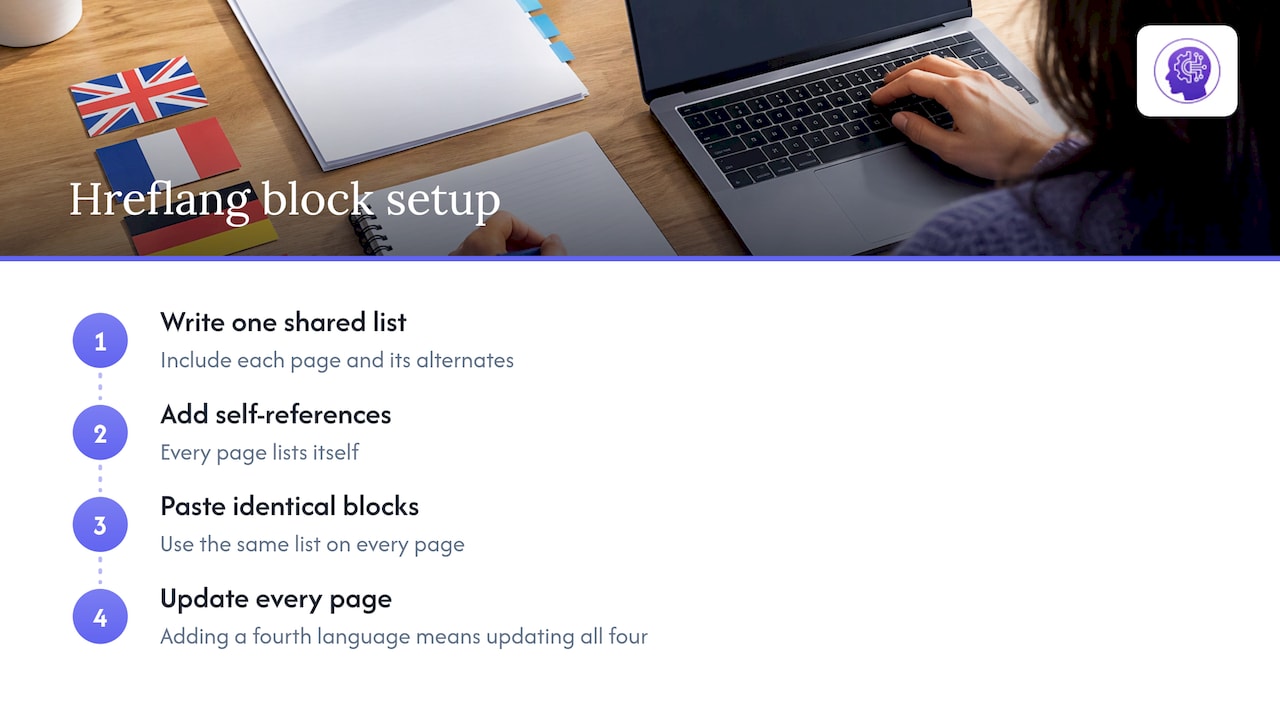
A simple way to think about it: write the list once, and paste the exact same list on every page in the group. Do not write a custom list per page. When you add a fourth language, you update all four pages, not just the new one.
When you ask your AI assistant to make the change, say that explicitly. For example: “Add the same hreflang block to all four language versions of the home page, including a self-reference and x-default.” On WebsitePublisher every change is live immediately, so you can open the page source right afterward and confirm the block is there.
How to set up x-default
x-default is the entry for users whose language or region is not in your list. Per Google, it is particularly suited to language or country selectors, but it can also point to a fallback or a version you choose as the default. You add it as another alternate annotation with hreflang="x-default" and the fallback URL. No language code is needed.
In Google’s blog post on x-default, Gary Illyes explains that the destination can be a selector page, a page used when regional content is not available, or a default version you pick on purpose.
Which should you choose?
- You have a selector page (“Choose your country”): point x-default there.
- You have no selector, and English is your widest-reach version: point x-default to the English page.
- You have one main version and a few regional extras: point x-default to the main version.
The x-default URL should itself be one of the pages in the set, with the same block of tags on it. It can be the same URL as one of your language versions. For example, your English page can carry both hreflang="en" and be the target of x-default.
Worked example: a freelancer with a three-version portfolio
Say you are a freelance designer. You have an English portfolio for the US, a UK English version with local pricing language, and a German version for clients in Germany.
- Create the pages.
/en-us/,/en-gb/,/de/, plus a home page at/where visitors choose. - Write the list once. Three alternates, plus
x-defaultpointing to/. - Paste it on all four pages. The home page lists itself as x-default, and the others list themselves with their own codes.
- Repeat for each page that has a counterpart. If your “Services” page exists in all three versions, it gets its own block with its own URLs. If “Case studies” exists only in English, leave hreflang off it or list only the versions that exist.
- Check the live page source. Look for matching URLs, correct codes and the self-reference.
The per-page step matters. Hreflang pairs pages with pages, not sites with sites. Pointing every page’s tags at the home pages of other languages is a common error.
Testing your hreflang setup
Test the live pages, not your intentions. Work through this list:
- Every
hrefis fully qualified, withhttps://. - Every language and region code is valid. Google lists invalid codes as a common error.
- Each page lists itself.
- Each alternate page lists the original in return. Google also lists missing return links as a common error.
- If you use a sitemap, every entry carries the complete set.
- The URLs return normal pages, not errors or redirects.
Hreflang testing tools
Chrome Lighthouse gives a fast code audit of head and response-header links. Know its limits: it checks for invalid language codes, but it does not validate region codes or sitemap annotations. Use it as a first pass.
Google’s documentation also points to Merkle’s hreflang tag testing tool for checking a single live page, and Aleyda Solis’s generator for creating tags. Google notes that it does not maintain or check third-party tools. Yoast’s guide also stresses testing return links, because checking one page’s tags alone will not reveal reciprocity failures. Use a tool or browser extension that follows each declared URL and reads its tags.
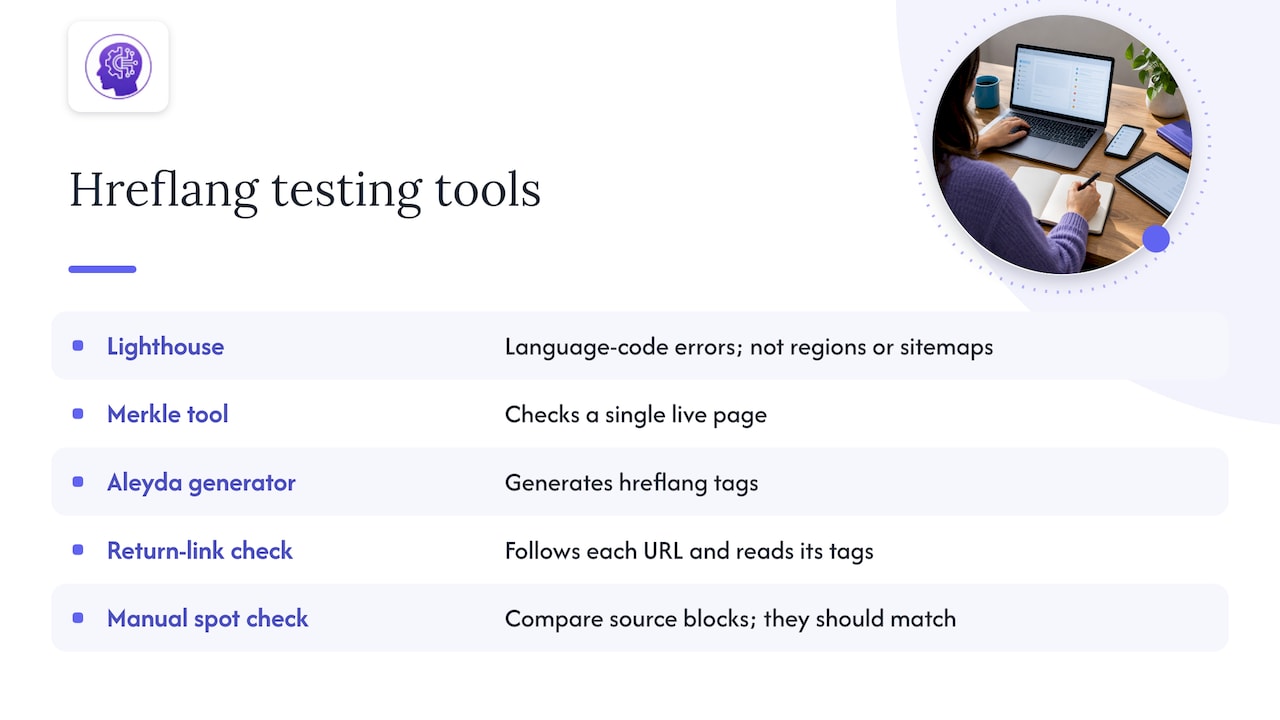
A manual spot check is also worth the two minutes. Open the source of each version and compare the blocks. They should be identical.
Common mistakes and quick fixes
| Mistake | Fix |
|---|---|
| Tags only on the new page | Add the full block to every page in the group |
| No self-reference | Include the page’s own URL and code in its list |
en-UK |
Use en-GB |
Region code alone (US) |
Add the language: en-US |
Relative URLs (/de/) |
Use https://example.com/de/ |
| Auto-redirecting by browser language | Let each URL stay reachable, and offer a selector |
| Mixing all three methods | Choose one and maintain it |
| Tags pointing to redirected or missing URLs | Point to the final, live URL |
Build hreflang pages and tags in one place
Hreflang is easier when the pages, the backend and the tags live in one project. WebsitePublisher is a full-stack AI web platform for websites and apps. Hosting, auth, payments, forms, email, uploads and data are built in, and your AI assistant snaps together 140+ tested integrations. It connects through the WebsitePublisher connector (MCP), so ChatGPT, Claude, Gemini, Grok and other assistants can build and publish for you. Project memory stays across sessions and assistants, so you can switch AI and keep your context.
For a multilingual build, that means you describe each language version, ask for the shared tag block on every page, and check the live source straight away. See the supported AI platforms, or look at the plans on the pricing page.
Our perspective
Most hreflang trouble is a maintenance problem, not a knowledge problem. The rules fit on one page. The trouble starts when a site grows from two languages to four and nobody updates the old pages.
That is why we think the best setup is the one you can regenerate in a single request. When your AI assistant builds and publishes through the WebsitePublisher connector, you can ask it to apply one shared block of alternates to every version. Every change on WebsitePublisher is live immediately, so you open the page and see the result.
WebsitePublisher is full-stack. Pages, forms, data and the rest of the backend sit in one project for websites and apps. Project memory and task history carry over between sessions and between assistants, so the decision “x-default points to the selector page” is still on record when you come back in three months, or when you switch from one AI to another.
Our advice: decide the URL structure first, write the alternate list once, and apply it everywhere. Then test the return links. Treat every new language as a task that touches every existing page.
FAQ
Do I need hreflang if my site has only one language?
No. Hreflang is for sites with translated pages or content adapted for different regions. Per Google’s documentation, it helps Search show the more appropriate version of a page. If you have one version, there is nothing to choose between.
Can I use hreflang tags and an XML sitemap together?
You can, but Google says using more than one method brings no Search benefit. Pick one and keep it complete. Two partial sets that disagree cause more trouble than one clean set.
Does x-default have to point to a language selector?
No. A selector is a good fit, but the target can also be a fallback page or a default version you choose. What matters is that it serves users whose language or region you do not list, and that the page carries the same block of tags.
Why does Google still show the wrong language version?
Hreflang is a hint. Canonical tags, thin differences between versions, and indexing problems can all change which URL shows. Check that each version is indexable, that the content differs in a real way, and that the return links are in place.
Sources
- Localized Versions of your Pages, Google Search Central
- Managing multi-regional and multilingual sites, Google Search Central
- How x-default can help you, Google Search Central Blog
- Hreflang audit, Chrome Lighthouse
- What Is Hreflang? A Guide to Multilingual SEO Success, Search Engine Land
- hreflang: the ultimate guide, Yoast
Recommended
Build your site the same way
Describe what you want. Your AI builds and publishes it — with the full stack behind it: data, auth, forms, payments, integrations and hosting.
See how it works →