 Website


website migration checklist
SEO First Website Migration Checklist for Marketing and Engineering
SEO first migration checklist to protect rankings: snapshot your baseline, map all URLs, implement 301 redirects, and monitor for 90 days.
A website migration can avoid major traffic loss when three things happen in order: you snapshot your current analytics and rankings, build a complete old-to-new URL map, and implement server-side 301 redirects with zero chains. Skip any of those three and you’re gambling. Unplanned migrations can trigger organic traffic losses of roughly 30 to 50 percent when redirects, canonical tags, or indexability break during the switch. A small dip of 10 to 15 percent for a couple of weeks is normal recovery. Anything bigger, or anything that doesn’t bounce back, means you missed a step.
TL;DR:
- Proper planning requires identifying high-value pages and snapshotting current analytics, rankings, and URL inventory before migration.
- Building a complete, tested redirect map using server-side 301 redirects is critical to avoid traffic loss, especially for high-traffic or backlink-rich pages.
- Staging environments must be thoroughly tested for indexing, redirects, Core Web Vitals, and third-party integrations to prevent live errors.
- Launch success depends on immediate verification of redirect behavior, sitemap updates, and real-time monitoring of traffic and server errors.
- Post-migration, daily checks for crawl issues, traffic changes, and backlink updates are essential, as normal traffic dips of 10-15% can occur but should recover within weeks.
Table of Contents
- Website Migration Checklist: Pre-Migration Planning Steps
- Building And Testing On Staging Before Launch
- How Do You Map Old URLs To New Ones?
- What Happens On Launch Day?
- Post-Launch Monitoring: What To Watch In The First 90 Days
- What Our Team Sees Break During Migrations
- SEO Impact Assessment And Keyword Ranking Preservation
- Company Perspective: Choosing The Right Migration Strategy
- How WebsitePublisher.ai Reduces Migration Overhead
- Sources
- FAQ
Website Migration Checklist: Pre-Migration Planning Steps
Every migration that goes sideways skipped this phase, or rushed it. The work here isn’t glamorous, but it’s the difference between a controlled move and a scramble.
Start by naming a project owner and writing down what success looks like. “Don’t lose traffic” isn’t a metric. Set that number now, and set your rollback criteria at the same time: if organic traffic drops more than a defined threshold for more than a set number of days, you revert.
From there, work through this sequence:
- Crawl the entire live site with a tool like Screaming Frog or Sitebulb and export every indexed URL, not just the ones in your sitemap.
- Identify your highest-value pages by traffic, conversions, and backlinks. Losing a page that ranks for a bottom-of-funnel term costs you more than losing ten pages nobody visits, since high-value pages carry disproportionate revenue impact relative to their share of total traffic.
- Snapshot your baseline. Pull Google Analytics 4 sessions, Search Console impressions and clicks, and export keyword rankings by page. Screenshot or export the data. You’ll need this exact baseline to judge whether post-launch dips are normal or alarming.
- Document every existing redirect and server configuration on the current site. Old redirects that go unmapped become the seeds of new redirect chains.
- Back up code, database, and media in full, with a tested restore process, not just a backup that sits untested in cold storage.
- Renew or confirm domain ownership well past your launch date, especially if the migration involves a domain change.
- Build a communication and scheduling plan. Lower your DNS TTL (time to live) to something like 300 seconds at least 48 hours before launch so DNS changes propagate fast when you need them to.
Pro Tip: Export your redirect list and your URL inventory into the same spreadsheet from day one. Teams that keep these separate almost always end up with orphaned redirects nobody remembers to map.
Building And Testing On Staging Before Launch
Staging is where you catch the mistakes that would otherwise become live incidents. Treat it as a full dress rehearsal, not a rough draft.
- Build the staging environment as a complete copy of the new site, blocked from public search engine indexing (via password protection or a noindex header, not a robots.txt disallow alone, which can still let URLs get indexed without content).
- Confirm hosting, TLS certificates, CDN configuration, and server capacity can handle expected launch-day load.
- Run full technical crawls with Screaming Frog or Sitebulb against staging, checking Core Web Vitals, structured data validation, and broken internal links.
- Test every third-party integration, analytics tag, Google Tag Manager container, form submission, and payment flow end to end, including any API tokens or webhook endpoints that connect to outside services.
- Document acceptance criteria per template type, not just per page, since one broken product template can break thousands of URLs at once.
| Test area | What to check | Pass criteria |
|---|---|---|
| Indexing block | Staging returns noindex or requires auth | Not indexable by search engines |
| Redirects | Sample of old URLs on staging config | All resolve with 301, no chains |
| Core Web Vitals | Largest Contentful Paint, Interaction to Next Paint, Cumulative Layout Shift | Meets or beats current live scores |
| Structured data | Schema markup validates | No errors in validation tools |
| Integrations | Analytics, GTM, forms, payments | Data fires correctly on staging |
Pro Tip: Test forms and payment flows with real submissions, not just visual checks. A form that looks fine but silently fails to send an email is one of the most common launch-day surprises.
How Do You Map Old URLs To New Ones?
Redirect mapping is the single most consequential piece of any website transfer checklist, and it starts with a complete inventory, not a guess.
Pull your canonical list of old URLs from your crawl, your XML sitemap, your analytics data, and Search Console’s indexed-pages report combined, since no single source captures everything search engines have indexed. Build your mapping rules from there, matching each old URL to its closest new equivalent by content and intent, not by folder structure alone.
Prioritize by value. Map and test your highest-traffic, highest-converting, and most-linked pages first, since these are the ones where a mistake costs the most.
For implementation, server-side 301 redirects are the recommended method for permanent URL moves, because they pass link equity reliably. A 302 redirect signals a temporary move and can delay how quickly search engines pass ranking signals to the new URL, which makes it the wrong choice for a permanent migration.
- Export any redirects already live on the old site and flatten them into your new mapping, so URL A doesn’t redirect to URL B which then redirects to URL C.
- Update every internal link on staging to point directly to the final new URL, never to an old URL that then redirects.
- Run bulk redirect tests using automated tools rather than manual spot checks, since scripted sampling catches errors across hundreds or thousands of URLs that manual review misses.
- Keep redirects live for at least 180 days after launch, longer if the old domain still carries external backlinks.
Pro Tip: If your migration only changes a subfolder or subdomain rather than the whole domain, you can’t use Search Console’s Change of Address tool to speed things along. Your only lever is a clean, complete set of 301s, so budget extra QA time here.
What Happens On Launch Day?
Launch day success comes down to sequencing and fast verification, not speed for its own sake.
- Check your rollback decision tree first. If any critical health check fails (site doesn’t load, database connection errors, payment processing down), revert immediately using your tested backup rather than troubleshooting live.
- Remove the staging indexing block, enable production redirects, publish your XML sitemap, and update robots.txt to reflect the new structure.
- Sample-check status codes across a representative set of URLs, confirming 301 behavior with no chains, and verify canonical tags and hreflang tags if the site serves multiple languages or regions.
- Submit your sitemap to Google Search Console and use URL Inspection on your highest-priority pages to request indexing directly.
- Verify analytics in real time, watching for live traffic, completed transactions, and successful form submissions within the first hour.
- Watch server logs and error rates for spikes in 4xx or 5xx responses, which often surface faster in raw logs than in analytics dashboards.
If this is a domain-level move, this is also when you run Search Console’s Change of Address tool, but only after redirects are live and you’ve verified ownership of both the old and new properties. It doesn’t work for path or subfolder changes, only full domain moves.
Post-Launch Monitoring: What To Watch In The First 90 Days
The first two weeks after launch decide whether your migration was a success or a slow-burning problem. Google recommends daily monitoring of Search Console coverage and 404 errors during this window, and that daily cadence isn’t optional if you want to catch issues before they compound.
- Check Search Console coverage reports, crawl errors, and 404s every day for the first 14 days.
- Compare daily traffic against your pre-migration baseline snapshot, page by page, not just site-wide.
- Watch for redirect chains, missing metadata, or pages accidentally left with a noindex tag from staging. All three are common and all three are fixable within hours if caught early.
- Rebuild your backlink inventory and reach out to sites linking to your highest-value old URLs, asking them to update links directly to the new URL rather than relying on the redirect indefinitely.
- Schedule formal audits at 30 and 90 days, and keep redirects live for the full retention window you set during planning.
A small, temporary dip is expected. A drop of 10 to 15 percent that lasts two to four weeks is a normal part of re-indexing. If your traffic drops further than that, or doesn’t recover within a month, something in your redirect map or your technical setup is broken, and the earlier you find it, the less it costs you.
What Our Team Sees Break During Migrations
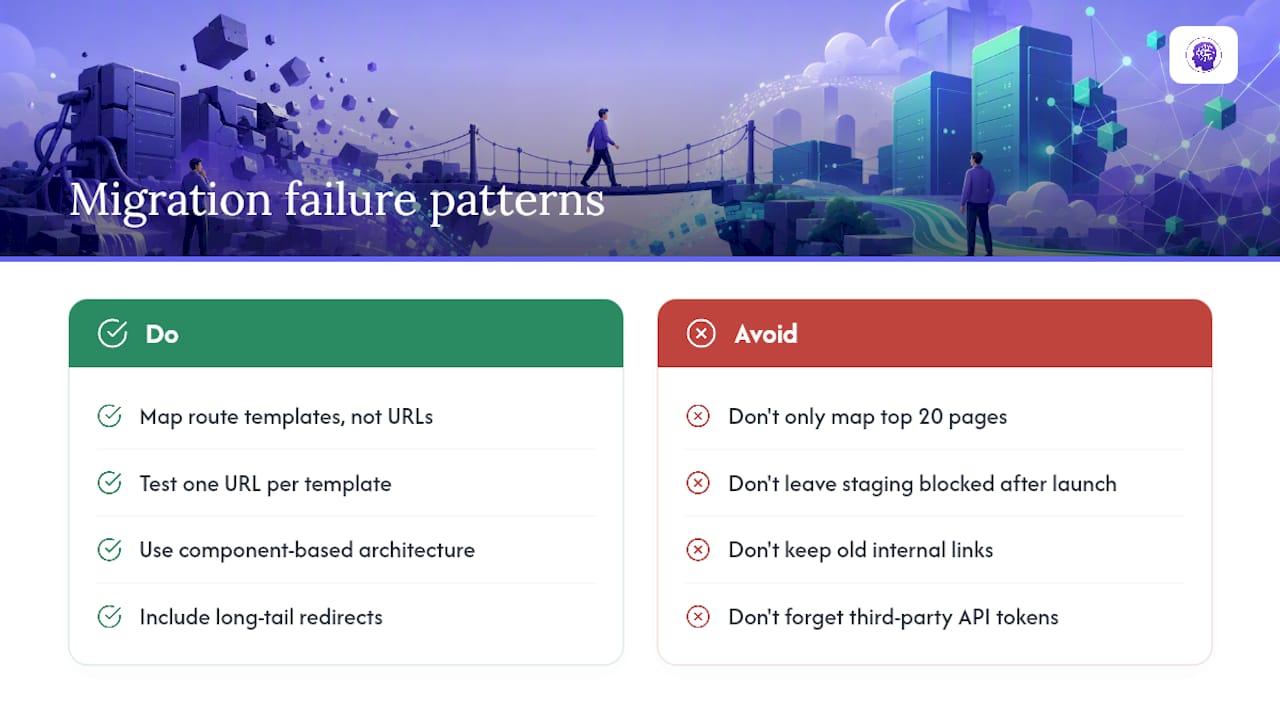
Across customer projects, the same failure patterns show up again and again: redirects that were mapped for the top 20 pages but never extended to the long tail, staging environments left blocked from indexing even after launch, internal links still pointing to old URLs months later, and third-party integrations that quietly stopped firing because nobody re-entered an API token.
The pattern we see most often isn’t a single catastrophic mistake. It’s a handful of small oversights, one unmapped redirect, one forgotten integration, one stale internal link, that individually look minor but compound into a traffic drop nobody can explain for weeks.
Component-based site architecture helps here because it shrinks the surface area that changes during a migration. When a header, a product template, or a contact form exists as one reusable component rather than being hand-coded on every page, fixing it after launch means fixing it once, not hunting across hundreds of individual files. For dynamic or componentized sites, map your route templates (like /products/:id) rather than just your rendered URLs, and test that each template’s render path works correctly on the new environment before assuming every generated page underneath it is fine.
Pro Tip: If your site uses dynamic routes, test one representative URL from every template pattern, not just your top pages. A broken template can silently take down thousands of generated URLs at once.
SEO Impact Assessment And Keyword Ranking Preservation
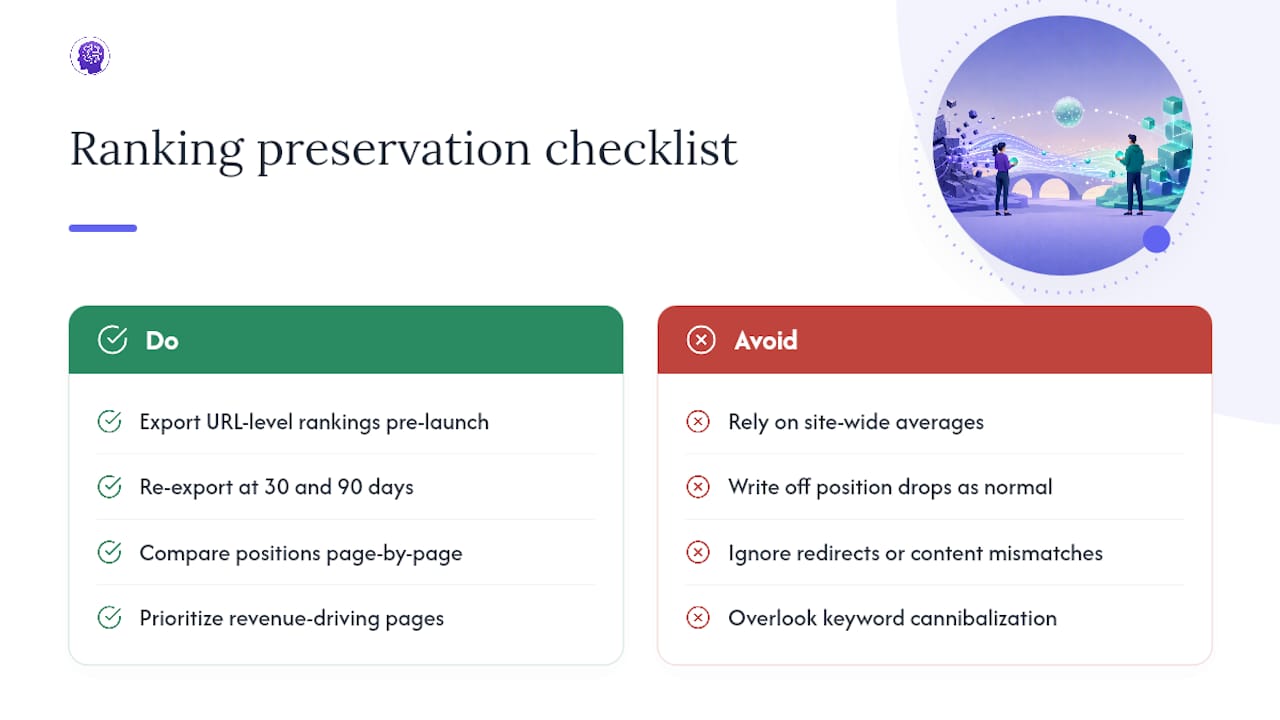
Ranking preservation is measured by comparing exported keyword positions from before launch against positions 30 and 90 days after, page by page rather than as a site-wide average. A site-wide average can look healthy while your ten highest-value pages quietly lost their positions.
Pull ranking data for your top pages before migration using Search Console’s performance report or a rank tracking tool, and export it at the URL level, not just by keyword. After launch, run the same export against the new URLs and compare directly. If a page held position 3 before migration and its 301-redirected equivalent is sitting at position 15 a month later, that’s a signal to check for content mismatches, thin redirects, or lost internal linking, not something to write off as normal fluctuation.
Watch for keyword cannibalization too. If your URL mapping consolidated two old pages into one new page, expect ranking behavior to shift as search engines re-evaluate which page best answers a given query. That’s different from ranking loss. It’s ranking consolidation, and it usually settles within a few weeks once the new page accumulates enough signals of its own.
The pages worth watching closest are the ones that drove revenue or leads before migration, since a ranking drop there costs more than an equivalent drop on a low-traffic blog post.
Company Perspective: Choosing The Right Migration Strategy
We generally recommend a chunked migration, moving sections in stages, for large or high-traffic sites, since it limits how much can go wrong at once. A full cutover works better for smaller sites where a chunked approach would drag out redirect complexity longer than it saves in risk.
If your team has one or two people who understand both your content structure and basic technical SEO, a lightweight internal runbook covering the steps above is usually enough. Bring in outside specialists when you’re moving a domain with thousands of backlinks, when nobody on the team has handled a migration timeline before, or when the site drives revenue you can’t afford to gamble on a first attempt.
How WebsitePublisher.ai Reduces Migration Overhead
WebsitePublisher.ai is built to make the technical side of a migration less of a burden in the first place. Because sites are built from reusable components rather than one-off coded pages, a fix that would normally require touching hundreds of individual files, updating a broken internal link, correcting a redirect target, adjusting a form endpoint, gets made once and applied everywhere that component appears.

The endpoints and API tokens you’d otherwise have to manually re-test after launch are managed inside the same platform your site runs on, which cuts down the number of moving parts your QA checklist has to cover. You describe your site in natural language, the platform generates it with a backend, and you keep control to make visual and content changes directly in your browser afterward, without needing a developer for every small fix. If you’re planning a migration and want a platform built to reduce that overhead from the start, explore the AI website builder or check current plans to see which tier fits your project.
Sources
- What is a Migration Hangover? Traffic Drop — How Do You Avoid It? — Search Engine Journal
- Change of address - Search Console Help — Google Support
- The Complete Website Migration Checklist SEO-Friendly — Semrush
FAQ
How Do You Do A Website Migration Step By Step?
Snapshot your current analytics and rankings, crawl and map every URL to its new destination, build and QA a staging environment, implement server-side 301 redirects, launch with sitemap resubmission, then monitor daily for the first two weeks.
How Do I Transfer One Website To Another Website?
Export your full URL inventory and content from the old site, rebuild or migrate it into the new platform, map every old URL to its new equivalent, and implement 301 redirects before pointing DNS to the new destination.
What Is The First Step In Any Website Migration?
The first step is setting clear goals and a rollback threshold, followed immediately by snapshotting your current analytics, rankings, and full URL inventory so you have a baseline to measure against.
What Is The Best Website Migration Tool?
There’s no single required tool. Screaming Frog or Sitebulb handle crawling and technical audits, Google Search Console handles indexing and Change of Address for domain moves, and a platform like WebsitePublisher.ai reduces the manual rebuild work for componentized or dynamic sites.
How Long Should You Keep Redirects Active After A Migration?
Keep redirects live for at least 180 days after a domain-level migration, and longer if external sites still link to your old URLs.
Build your site the same way
Describe what you want. Your AI builds and publishes it — with a real backend behind it.
See how it works →