 Website


headless cms vs traditional
Mixed Teams: 5 Questions to Choose Headless or Traditional CMS
Five questions to choose whether a headless or traditional CMS fits your team. Covers channel needs, preview tradeoffs, cost shapes, and migration tips.
If you need one website live fast and editors who can manage it without a developer, a traditional CMS is the right call. If you have to serve content to a website, a mobile app, and a kiosk from one source, and you have front-end engineers on staff, headless CMS architecture wins. Tools like WebsitePublisher.ai, REST and GraphQL APIs, and static-site generation now make either path workable, and hybrid setups exist for teams that cannot decide cleanly.
TL;DR:
- Headless CMS effectively supports multi-channel content distribution but requires dedicated frontend engineering, which increases operational complexity and costs.
- Traditional CMS offers faster launch times and native preview features but limits flexibility and scalability for cross-platform content deployment.
- Building a reliable preview environment in headless setups demands ongoing maintenance of preview endpoints and tokens, often overlooked during initial planning.
- A hybrid approach can provide a balanced solution for teams needing rapid deployment and multi-channel reach without the full overhead of a headless architecture.
- Piloting a single content type and establishing a preview workflow early can prevent migration stalls and reveal true frontend needs before full-scale implementation.
Table of Contents
- Headless CMS vs Traditional CMS: What Traditional Gets Right
- What Is a Headless CMS and When Does It Win?
- Headless vs Traditional CMS: A Side-By-Side Look
- Headless CMS Benefits and Trade-Offs vs Traditional
- What Does Headless CMS Actually Cost to Run?
- The Editor Preview Problem Nobody Warns You About
- How Do You Decide Between Headless and Traditional?
- Planning a Migration: What to Build First
- What We See in Customer Projects
- Choose the Architecture That Matches Your Team, Not the Trend
- Build Your Front End Faster, Whichever Architecture You Choose
- Sources
- FAQ
Headless CMS vs Traditional CMS: What Traditional Gets Right
A traditional, or monolithic, CMS bundles the editor, the database, and the templating engine into a single application. WordPress, Drupal, and Joomla all work this way: you log in, edit a page, hit publish, and the same system renders the HTML the visitor sees. There’s no separate API layer to build, no second application to deploy.
That coupling is the whole appeal. Traditional CMS platforms ship HTML directly and run on a simpler operational model, usually a single deploy target instead of a fleet of connected services. Editors see exactly what they’re publishing while they type, because the preview pane and the live page share the same rendering code.
This makes traditional CMS the better fit for single-website marketing sites, small teams without dedicated developers, and content-first blogs where speed to launch matters more than channel reach. A five-person marketing team can have a site live in days.
The drawbacks show up as the project grows. You’re locked into whatever templating language the CMS supports, plugin updates become a recurring maintenance chore, and serving that same content to a mobile app or a partner API means either duplicating content by hand or bolting on custom endpoints the platform was never built for.
What Is a Headless CMS and When Does It Win?
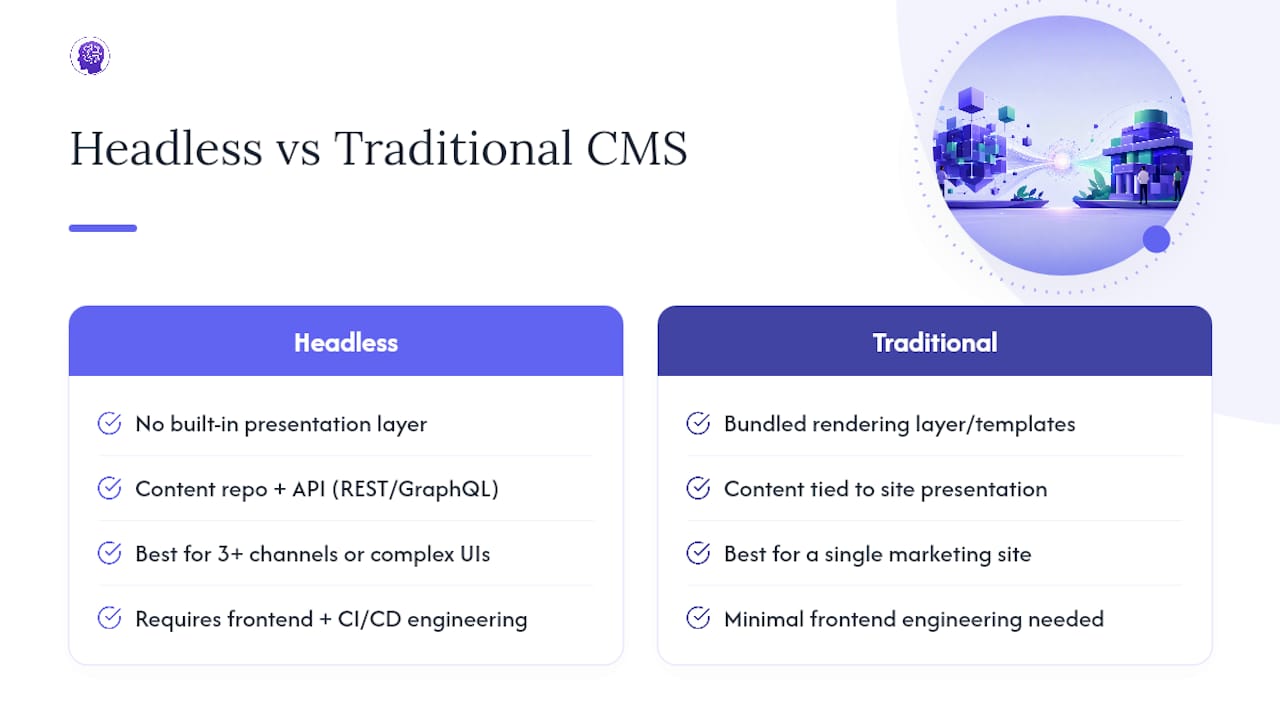
A headless CMS strips out the presentation layer entirely. What’s left is a content repository plus an API, usually REST or GraphQL, that any frontend can query. The content lives independently of how it gets displayed, so a website, an iOS app, a digital kiosk, and a partner integration can all pull from the same source of truth without duplicate entry.
That separation is the entire value proposition. A single blog post, product description, or event listing gets written once and rendered wherever it needs to appear, in whatever format that channel requires. Teams building with Next.js, Astro, or a native mobile stack get to pick their framework instead of inheriting whatever templating engine the CMS ships with.
The tradeoff is real engineering work. Headless architecture requires someone to build, deploy, and maintain the frontend, plus a CI/CD pipeline to ship changes to it. There’s no built-in rendering layer, so performance and SEO outcomes depend entirely on how well that frontend is engineered. A headless setup wired to a poorly optimized frontend will underperform a well-built traditional site, despite the architecture label.
Headless makes the most sense when content genuinely needs to reach three or more distinct channels, when you have front-end engineers who want framework freedom, or when you’re building something a traditional CMS’s templating system can’t handle, like a highly interactive product configurator. It’s overkill for a single marketing site with no near-term plans to expand beyond the web. If your team is one marketer and no developer, the API layer becomes a liability instead of a feature.
Headless vs Traditional CMS: A Side-By-Side Look
The core differences come down to where the frontend lives and how much operational surface area you’re taking on.
| Dimension | Traditional CMS | Headless CMS |
|---|---|---|
| Frontend | Built into the platform | Separate app you build and own |
| Editor preview | Native, in-context | Requires custom preview setup |
| Hosting model | Single deploy target | CMS + separate frontend hosting |
| Multi-channel support | Limited, often bolted on | Native, one API for all channels |
| Operational complexity | Low | Higher, more moving parts |
| Performance ceiling | Good, capped by platform | High, but depends on implementation |
| Cost shape | Predictable, often flat | Variable, scales with usage and headcount |
The practical read: traditional CMS asks less of your team on day one but caps what you can build. Headless asks for a frontend engineer and a CI/CD pipeline up front, in exchange for a performance ceiling and channel reach a monolithic platform can’t match. Staffing is the real deciding factor. A traditional CMS project can run with zero developers; a headless project generally can’t.
Headless CMS Benefits and Trade-Offs vs Traditional
Weighed against each other honestly, neither architecture wins across the board. Each has a set of benefits that matter enormously in the right context and barely at all in the wrong one.
Headless benefits:
- Content reuse across web, mobile, and kiosk channels from one repository
- Full framework freedom for the frontend team
- A smaller public attack surface, since there’s no exposed admin or plugin ecosystem to target
- Performance that scales well when paired with a CDN or static-site generation
Traditional benefits:
- Faster time-to-launch, often days instead of weeks
- Native WYSIWYG preview with zero extra engineering
- Lower operational overhead for a single-site project
- One vendor, one bill, one system to patch
The claim worth pushing back on is “headless is always faster.” It’s only faster once you factor in caching and rendering strategy. A headless site rendered client-side with no caching can be slower than a well-tuned WordPress install. Pairing headless with modern stacks like Next.js or Astro using static-site generation or incremental static regeneration on an edge CDN is what produces those strong Core Web Vitals scores you see cited in headless marketing. Skip that engineering step and the speed advantage disappears.
What Does Headless CMS Actually Cost to Run?
Budgeting for either architecture means adding up more than the CMS license.
Those ranges come from actual pricing tiers across the market, not a single vendor’s price sheet, and they don’t include the costs that catch teams off guard: preview infrastructure, integrations with a PIM, CRM, or DAM, developer hours, and plugin licenses on the traditional side.
A workable heuristic for multi-channel projects: budget the CMS SaaS fee, frontend hosting, CDN costs, and 0.5 to 1.5 full-time frontend engineers for the first six to twelve months of implementation and preview plumbing. Start with a small pilot before committing to a platform tier that assumes scale you don’t have yet.
The Editor Preview Problem Nobody Warns You About
In a traditional CMS, preview is trivial: the editor and the live page share the same rendering engine, so what you see while drafting is what visitors get. Headless breaks that link. The CMS often shows editors raw JSON instead of a rendered page, because the content repository has no idea how the frontend will display anything.
Teams solve this with draft-mode endpoints, short-lived preview tokens, or an iframe that loads the live frontend with unpublished content injected. Each approach works, but each requires the frontend team to build and maintain it. This is consistently the most underestimated line item in headless migrations. Plan for ongoing upkeep, not a one-time build. Token rotation, expired preview links, and content models that change after launch all generate recurring work.
How Do You Decide Between Headless and Traditional?
Run through these five questions before committing to either architecture:
- How many channels need this content? One website, or web plus mobile plus kiosk plus partner API?
- Do you have front-end engineers who can own a separate frontend app long-term?
- How much autonomy do editors need without pulling in a developer for every change?
- How fast does this need to launch, in weeks or months?
- Where is this project headed in 18 months, one site or a content platform serving multiple products?
Two or more answers pointing toward multi-channel, developer-owned, and long-horizon growth means headless is the better bet. Mostly single-channel, editor-driven, and fast-to-launch answers point straight at traditional.
The red flag worth watching for is a team that answers “headless” on channel count but has no frontend engineer to own the build. That’s where hybrid, or a monolithic-modern CMS with an added API layer, reduces risk. You get the fast launch and native preview now, with an API path open for later.
Planning a Migration: What to Build First
If you’re moving toward headless or a hybrid setup, sequence the work to surface problems early rather than at launch.
- Pilot one content type on a single frontend page before touching the rest of the site.
- Use that pilot to validate the preview workflow and the build pipeline together, not separately.
- Set up CI/CD and a caching strategy before writing production content, not after.
- Staff realistically: budget dedicated frontend hours, not a side project for someone already busy.
- Plan for parallel publishing during the transition. Nothing should go dark while the new system comes online.
Teams that skip the pilot and migrate everything at once are the ones who discover the preview problem in production, in front of editors who now can’t do their jobs.
What We See in Customer Projects
Across the projects we support, the same pattern repeats: teams underestimate preview work and overestimate how fast a full headless rebuild will go. The teams that succeed pilot one page, get preview working, then expand.
WebsitePublisher.ai fits into this picture as a front-end iteration layer. Our Contentful integration lets teams pull content from a headless repository while building and updating the frontend through conversational prompts instead of a full custom build. For teams testing whether headless is worth the investment, that speeds up the pilot stage considerably, without locking in a rendering approach before you’re sure it’s the right one.
Choose the Architecture That Matches Your Team, Not the Trend
The mistake we see most often isn’t picking the wrong architecture. It’s picking an architecture based on what’s trending in engineering blogs rather than what the team can actually staff and maintain. Headless is genuinely superior for multi-channel content, but only for teams with the frontend capacity to own it. Chasing that architecture without the engineering headcount just moves the pain from “the CMS is limiting us” to “our preview environment is broken and nobody can fix it.”
Hybrid setups get dismissed as a compromise, but for teams with mixed skill sets, they’re often the better call rather than the fallback one. A team that needs API access for one channel and fast editor workflows for everything else doesn’t need a full headless rebuild to get both.
If there’s one practical suggestion worth acting on before anything else, it’s this: pilot the hardest part first. Build your preview workflow before you build anything else, because that’s where migrations stall.
Build Your Front End Faster, Whichever Architecture You Choose
Whether you land on headless, traditional, or hybrid, the frontend still has to get built, and that’s usually where timelines slip. WebsitePublisher.ai lets you describe the site or landing page you need in plain language and get a working front end without writing the scaffolding by hand, with a browser-based visual editor for ongoing changes so you’re not stuck regenerating content every time something needs to shift.

For teams piloting a headless setup, our Contentful integration connects your content repository to a frontend you can iterate on quickly, and our React deployment option gives developers a framework they already know. Reusable components keep design consistent across pages as you scale from one pilot page to a full site. Plans start at $4.61 a month for Solo, with Pro and Agency tiers for teams managing multiple projects. If you’re deciding between architectures right now, the fastest way to find out what your team actually needs is to pilot a page and see how the preview workflow feels in practice. Check the pricing page and start with a single project.
Sources
- What is a headless CMS? — AWS
- Headless CMS vs Traditional CMS: Key Differences — UnfoldCMS
- Headless editing experiences — Netlify guide
- Salesforce signs definitive agreement to acquire Contentful — Salesforce News
FAQ
What Are the Disadvantages of a Headless CMS?
The main disadvantages are the loss of native, in-context preview, the need for a dedicated frontend team to build and maintain a separate application, and higher operational complexity from running multiple connected systems. Costs can also run higher, since SaaS headless pricing ranges widely depending on usage and tier, and frontend hosting is a separate line item.
Which Headless CMS Is Best?
There’s no single best option. It depends on your budget, your team’s technical stack, and how many channels you need to serve, and pricing plus vendor stability should factor into that decision, since large platform acquisitions can shift roadmaps and pricing over time. Teams already using a headless CMS like Contentful can connect it to WebsitePublisher.ai to speed up frontend iteration without switching content platforms.
Can You Give an Example of a Headless CMS?
Contentful is a widely used example of a headless CMS: it stores content in a repository and exposes it through an API rather than rendering pages itself. Frontends built with frameworks like Next.js or Astro, or through a tool like WebsitePublisher.ai, then pull that content and handle the actual presentation layer.
What Does “Headless” Mean in CMS?
“Headless” means the CMS has no built-in presentation layer, no “head.” It stores and manages content, then exposes it through an API like REST or GraphQL, so any frontend, website, app, or device, can request and display that content independently.
Recommended
Build your site the same way
Describe what you want. Your AI builds and publishes it — with a real backend behind it.
See how it works →