 Website


dynamic vs static website
Static First vs Dynamic Websites: 3 Clear Calls for Small Teams
Practical static-first guidance for small teams choosing static, dynamic, or hybrid sites. Three clear prescriptions, prototyping tips, and speed checks...

A static website serves pre-built HTML files to every visitor exactly as they were saved; a dynamic website builds the page on the server the moment someone requests it. For most projects, the smartest move is static-first: start with pre-rendered pages for speed and security, then bolt on dynamic features like carts or logins only where the site truly needs them.
TL;DR:
- Static sites create and serve pre-built HTML files, offering faster load times and lower security risks but limited personalization options.
- Dynamic sites generate content on request using server-side code and databases, enabling real-time updates and user-specific content at higher costs and security exposure.
- Hybrids like Jamstack combine static pre-rendering with API-driven dynamic features, balancing speed, security, and interactivity through edge functions and incremental static regeneration.
- For informational sites, static architecture usually suffices, while projects needing user accounts or real-time data should opt for a dynamic or hybrid approach.
- Starting prototypes with a static site generator or a CMS paired with serverless functions helps evaluate performance and suitability before full deployment.
Table of Contents
- Dynamic vs Static Website: What “Static” Actually Means
- How Do Dynamic Websites Generate Content?
- What Are the Key Differences Between Static and Dynamic Sites?
- What Are the Real Advantages and Disadvantages of Each?
- When Should You Use Static vs. Dynamic Architecture?
- How Can You Tell If a Site Is Static or Dynamic?
- How Do Jamstack and Edge Computing Change the Equation?
- What’s the Simplest Way to Start Building Either One?
- What’s the Right Call for Your Project?
- Why I Think Static-First Is Winning the Architecture Debate
- Build Your Static-First or Hybrid Site Without Writing a Backend from Scratch
- Sources
Dynamic vs Static Website: What “Static” Actually Means
A static site is a folder of finished HTML, CSS, and JavaScript files. Nothing gets assembled on the fly. When someone types your domain into a browser, the server hands over the exact same file it would hand any other visitor, whether that’s the first request of the day or the ten-thousandth.
Most builders don’t hand code these files one by one anymore. A static site generator (SSG) like Jekyll, Hugo, or Astro takes content (often written in Markdown) and templates, then compiles everything into finished HTML during a “build” step. You write once, run the build, and out comes a stack of ready-to-serve pages. That build usually happens on a hosting platform or a continuous integration pipeline, and the resulting files get pushed to a content delivery network (CDN), a global network of servers that stores copies of your site close to wherever your visitors actually are.
The flow looks like this in practice:
- Build: the SSG compiles your content and templates into static files.
- Deploy: those files upload to a hosting platform connected to a CDN.
- Serve: a visitor’s request gets answered by the nearest CDN node, not a distant origin server.
This is why static sites consistently post fast Largest Contentful Paint (LCP) scores, one of the three Core Web Vitals Google uses to judge page experience. There’s no database query, no server-side computation, and no waiting on backend logic. There’s also less to attack: static sites serve pre-built HTML files with a smaller attack surface than sites running server code and databases, because there’s no login form, no query string, and no server-side script for an attacker to exploit.
Pro Tip: Check a site’s Core Web Vitals scores for free in Google’s PageSpeed Insights before you commit to an architecture. A slow LCP on a competitor’s dynamic site is often the clearest sign that a static rebuild would win them traffic.
How Do Dynamic Websites Generate Content?
A dynamic website builds each page at the moment it’s requested, pulling data from a database and running it through server-side code before anything reaches the browser. That’s the core distinction in any comparison of static and dynamic websites: one serves a finished file, the other assembles the file live.
Behind a typical dynamic site sits a content management system (CMS) like WordPress or a custom application built on a framework such as Next.js or Ruby on Rails, paired with a database like MySQL or PostgreSQL. When a visitor loads a page, the server queries the database, merges the result with a template, and sends back freshly generated HTML. Log in five minutes later and the page might look completely different, because the underlying data changed.
This model exists because some experiences simply cannot be pre-built. You cannot pre-render a shopping cart that reflects what one specific visitor put in it, a logged-in dashboard showing one user’s private data, or a search results page responding to a query nobody typed until that second. Dynamic websites generate pages on demand using server-side code and databases, and that’s essential wherever content must be personalized or updated in real time.
The trade-off shows up in daily operations, not just architecture diagrams:
- Every request costs server processing time, so traffic spikes can slow things down or raise hosting bills.
- CMS plugins and server software need regular patching, since each one is a potential entry point for attackers.
- Database performance, backups, and uptime become your responsibility, not a CDN’s.
None of that makes dynamic sites the wrong choice. It just means you’re taking on infrastructure that a static site never asks for.
What Are the Key Differences Between Static and Dynamic Sites?
The two models split apart on one question: does the page get built once, ahead of time, or freshly, on every request? Everything else, cost, security exposure, and how the site behaves under load, follows from that single decision.
| Dimension | Static site | Dynamic site |
|---|---|---|
| How content is generated | Pre-rendered at build time, served as-is | Generated per request via server code and database queries |
| Performance/latency | Fast, CDN-served, minimal server round-trips | Slower under load; depends on server and database response time |
| Hosting & cost | Cheap or free CDN hosting; scales with almost no added cost | Server or PaaS hosting; costs climb with traffic and complexity |
| Security surface | Smaller; no live database or login endpoints to exploit | Larger; databases, forms, and plugins create more entry points |
| Best use cases | Marketing sites, docs, portfolios, blogs | Ecommerce carts, user dashboards, authenticated apps |
A few patterns matter more than the rest of the table. Static hosting on a CDN tends to hold steady performance even during traffic spikes, since every visitor pulls from a cached, unchanging file, an outcome tied directly to better Core Web Vitals and search visibility. Dynamic sites, by contrast, need real capacity planning: more visitors mean more database queries, and more database queries mean either a bigger server bill or a slower page.
If your project needs personalized dashboards, real-time inventory, or user accounts, dynamic architecture is not optional. If your project is mostly informational, static wins on nearly every practical measure that matters to a small team.
What Are the Real Advantages and Disadvantages of Each?
Static sites win on the metrics that show up in analytics and Google Search Console. Because pages are pre-built and CDN-delivered, they load fast, which directly improves conversions and search rankings tied to page speed. There’s no database to secure, no login form to harden, and often no monthly server bill beyond a few dollars, if that.
The catch: static sites can’t personalize content per visitor without extra tooling, and every content update technically requires a rebuild and redeploy, even if that process now takes seconds on modern platforms.
Dynamic sites flip that equation. They can:
- Show different content to different logged-in users in real time.
- Update inventory, pricing, or availability instantly across the whole site.
- Support complex workflows like checkout, account management, or search.
The price for that flexibility is ongoing cost and exposure. Every dynamic page that touches a database is a potential target for injection attacks, where malicious input tricks a server into running unintended commands against that database. Server costs scale with traffic instead of staying flat, and CMS plugins need constant patching to stay ahead of known vulnerabilities.
The good news is that most of these drawbacks have mature fixes. Caching strategies and CDNs mitigate dynamic latency by storing the results of expensive database queries so the server doesn’t repeat the same work for every visitor. Edge functions push small pieces of dynamic logic (like checking a login cookie or personalizing a headline) closer to the visitor, without dragging the entire page through a slow origin server.
Pro Tip: If your dynamic site’s biggest weak point is speed, start with caching before you touch the code.
When Should You Use Static vs. Dynamic Architecture?
Match the architecture to what the site actually needs to do, not to what feels more modern. Here’s how that plays out across the projects people build most often:
- Brochure sites, documentation, and portfolios. These rarely change moment to moment and have no per-user personalization. Static wins on cost, speed, and simplicity almost every time.
- Ecommerce stores with live inventory and checkout. Cart state, payment processing, and stock levels require server-side logic and a database. This is dynamic territory, full stop.
- Authenticated apps and dashboards. Anything showing one user their own private data, a client portal, an analytics dashboard, needs dynamic rendering tied to a session.
- Blogs with a static marketing shell and a user comment or login area. This is where hybrid architecture earns its keep: pre-render the article pages, then load comments or account features through a small dynamic API call.
- Storefronts that want fast marketing pages but real-time product data. Pre-render the homepage and category pages; keep cart and checkout dynamic.
Run through a short checklist before you commit: How much of your traffic hits pages that look identical for every visitor? How often does content actually change, hourly, or monthly? Does any page need to know who’s logged in? If most answers point to “rarely” and “no,” you’re a static candidate. If personalization or transactions show up early in your answers, plan for dynamic or hybrid from day one.
How Can You Tell If a Site Is Static or Dynamic?
You don’t need developer tools to start investigating, just a browser and a few minutes.
- View source. Right click and select “View Page Source.” Static pages usually show finished, human-readable HTML with no obvious template placeholders. Dynamic pages often show signs of server-side rendering, unusual generated class names, inline JSON blobs, or CMS-specific markup patterns.
- Check the network tab. Open your browser’s developer tools, load the page, and watch the Network panel. A dynamic site typically fires API calls to fetch data (look for requests returning JSON) and often sets session cookies. A static page usually shows a short burst of file requests and nothing more.
- Look at the URL structure. Static sites often end pages in
.htmlor use clean folder-style paths tied to actual files. Dynamic sites frequently show query strings like?id=482or CMS route patterns. - Run a curl request. From a terminal,
curl -Ion a URL shows response headers. Headers likeX-Powered-By: PHPorSet-Cookieare strong dynamic signals; a bare, minimal header set often points to static, CDN-served content.
These detection methods get murkier on hybrid sites, where a static shell loads dynamic widgets through client-side JavaScript. A page can look completely static in its initial HTML and still make live API calls a second later, so treat these checks as strong signals, not absolute proof.
How Do Jamstack and Edge Computing Change the Equation?
Most high-performing sites today aren’t purely static or purely dynamic. They’re hybrids, and the architecture behind that shift has a name: Jamstack. Jamstack recommends pre-rendering static assets and using APIs for dynamic features, keeping the speed and security of static delivery while still supporting logins, comments, or personalized content through targeted API calls rather than full server-side rendering.
The mechanics are simpler than the name suggests. A framework pre-builds most of the site, then loads narrow slices of dynamic behavior through client-side JavaScript hitting small, focused APIs. Static assets plus client-side JavaScript can produce genuinely interactive experiences without needing a server to render every page from scratch.
Two patterns show up constantly in modern hybrid builds:
- Edge functions, small pieces of server logic that run on servers close to the visitor rather than one distant origin server, handling things like personalization or A/B testing in milliseconds.
- Incremental static regeneration (ISR), where a static page automatically rebuilds in the background after a set time or event, so content stays fresh without a full manual redeploy.
Static delivery paired with edge functions lets teams keep near-static performance while still personalizing headlines, pricing, or recommendations for individual visitors. The discipline that matters here is budgeting: pre-render everything that can be pre-rendered, and only push functionality to a dynamic route or edge function when it delivers a measurable gain a static page cannot.
What’s the Simplest Way to Start Building Either One?
You don’t need a large stack to prototype any of these approaches, just the right starting pieces for the job.
For a static site: pick an SSG (Hugo, Astro, or Eleventy are common starting points), host the output on a CDN-backed platform, and handle contact forms through a third-party form service rather than building your own backend.
For a dynamic site: choose a managed CMS or a platform-as-a-service (PaaS) paired with a hosted database, and budget time for ongoing patching, backups, and monitoring, since that maintenance burden doesn’t go away after launch.
For a hybrid build: pair a headless CMS (content managed separately from presentation) with an SSG for the static shell, then add serverless APIs or edge functions for anything that has to be dynamic, carts, logins, personalization.
Whichever path you choose, deploy early and run Core Web Vitals checks against a real, live version of the site. Numbers on a staging environment rarely match what visitors experience once a CDN, real network conditions, and actual content are in play. Treat the first deploy as a baseline, not a finish line, and iterate from there.
What’s the Right Call for Your Project?
Three prescriptions cover almost every reader here. If your site is informational, brochure content, a portfolio, documentation, go static-first: it’s cheaper, faster, and there’s simply less that can break. If your project genuinely requires accounts, transactions, or real-time data, build dynamic from the start rather than fighting the architecture later. If you’re somewhere in between, a blog with a login area, a store with a fast marketing front end, build hybrid: static for everything that can be pre-rendered, dynamic routes only where the data demands it.
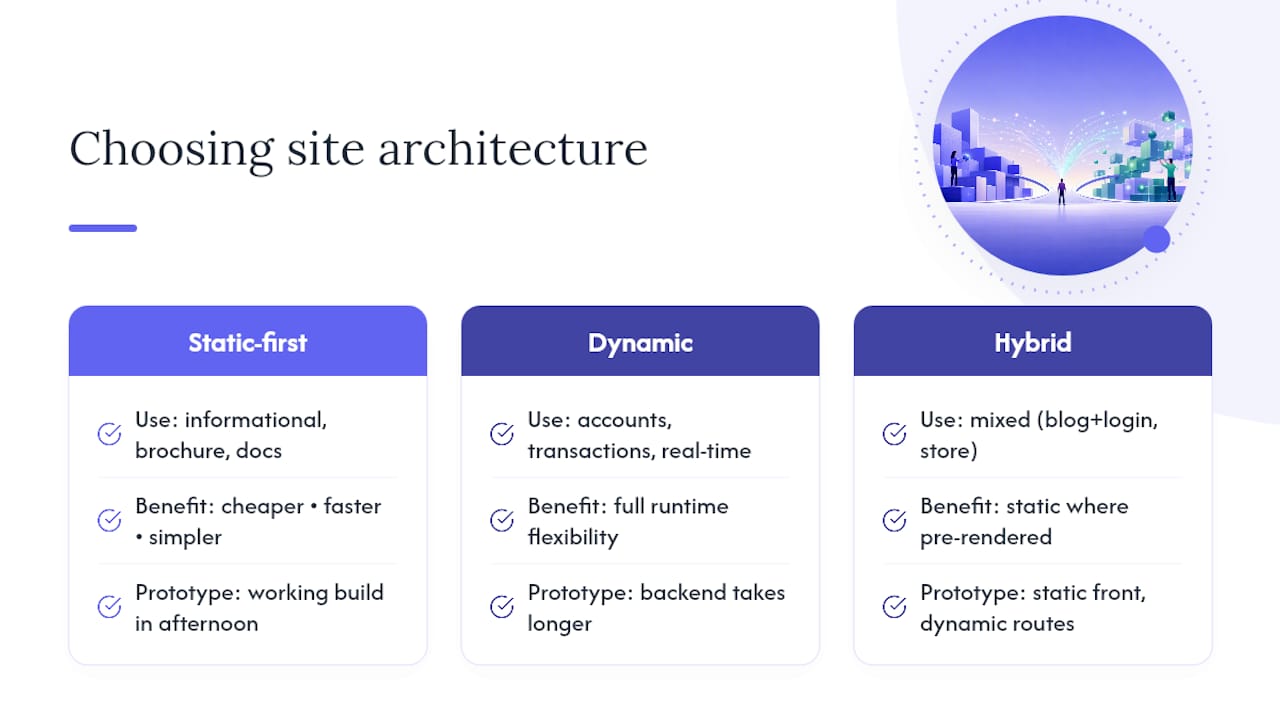
Whichever path fits, prototype before you commit. A working static build takes an afternoon; a working dynamic backend takes longer but tells you fast whether the complexity is actually worth it. Measure Core Web Vitals on both, and let the numbers, not the trend, make the final call.
Why I Think Static-First Is Winning the Architecture Debate
The industry spent the better part of a decade defaulting to dynamic, mostly because CMS platforms made it easy to reach for a database even when the content barely changed. That default is fading, and for good reason: a spectrum view of static vs dynamic architecture fits reality far better than a binary one. Most serious projects today are hybrids, pre-rendered where they can be, dynamic only where they must be.
What surprises people is how rarely a project actually needs full dynamic infrastructure.
The pattern I’d recommend to almost anyone starting fresh: build the marketing shell static, keep it fast and boring in the best sense, and treat every dynamic feature as something that has to earn its place on the page.
Build Your Static-First or Hybrid Site Without Writing a Backend from Scratch
Choosing static-first architecture is the easy part. Actually wiring up integrations, hosting, and the dynamic pieces you decide you need, forms, payments, a login flow, is where most solo builders and small teams lose weeks. WebsitePublisher.ai closes that gap: describe the site you want in plain language, and it generates a real, working build with over 104 pre-built integrations for email, payments, and lead capture already wired in.

That matters because a hybrid site isn’t just static pages plus a vague promise of “dynamic features later.” It’s reusable components and a real backend from day one, so when you need a contact form to actually send email or a checkout flow to actually process a payment, it’s already there instead of something you have to bolt on. The AI website builder works with ChatGPT, Claude, and Mistral, and you keep full control over content and design changes directly in your browser, no getting locked into one AI session or one static export you can’t edit later. If you’re weighing a static-first build against a dynamic one, check the pricing page and start describing your project today.
Sources
For readers who want to verify the claims in this guide or go deeper on any single piece, these sources cover the fundamentals well. Jamstack lays out the pre-render-plus-API philosophy behind most modern hybrid sites. MDN Web Docs explains server-side versus client-side roles in plain technical language. SiteGround and Strapi each break down one side of the divide in detail, while GeeksforGeeks offers hands-on detection steps, and Supadrop covers the performance case for static hosting.
Recommended
- AI Website Builder — Build Websites With ChatGPT, Claude & More
- React on WebsitePublisher.ai — Deploy React Landing Pages by Conversation
- Build Websites with Claude — Claude AI Website Builder
- Build Websites with ChatGPT — ChatGPT AI Website Builder
Build your site the same way
Describe what you want. Your AI builds and publishes it — with a real backend behind it.
See how it works →