 Website


dns records for website
4 DNS Records Every Website Needs, With Commands and Migration Checks
Learn the four DNS records required to publish a website and how to verify them with dig or nslookup. Includes TTL tactics, migration checks, and copy...
At minimum, a live website needs an apex A record (or AAAA for IPv6), NS records pointing to authoritative nameservers, and an SOA record for zone administration. Add MX and TXT records only if that domain sends or receives email. Verify all of it in minutes with dig, nslookup, or an online “ALL records” lookup tool, checking against the domain’s authoritative nameservers rather than a cached resolver. Cloudflare’s DNS learning hub and the setup flow inside WebsitePublisher.ai both walk through this same short list.
TL;DR:
- Ensuring the apex A or AAAA record (or an ALIAS or CNAME flattening workaround) points to your server is crucial for your website to load correctly.
- Nameservers must match your registrar’s records; mismatches are the most common cause of resolution failures.
- Lowering TTLs ahead of changes speeds up propagation, but caching delays can still cause outdated information to serve for hours.
- Adding email records like MX and TXT only if your domain sends or receives mail; otherwise, they increase security risks unnecessarily.
- Always verify DNS record changes directly against the authoritative nameservers to avoid issues caused by cached or stale resolver data.
Table of Contents
- Common DNS Record Types and When You Need Each
- Minimum DNS Records Needed to Publish a Simple Website
- How to Find and Check DNS Records: Commands and Web Tools
- DNS Propagation, TTL, and a Troubleshooting Checklist
- DNSSEC, CAA, and TXT Records: The Security Layer Most Sites Skip
- Ready-to-Use Record Templates and Recommended TTLs
- DNS Record Inheritance and Conflicts With CDNs and Third-Party Services
- Dynamic DNS: When Your IP Address Won’t Sit Still
- Setup Patterns and Mistakes We See at WebsitePublisher.ai
- An Integrated Path: Domain Registration Inside the Site Workflow
- Sources
- FAQ
Common DNS Record Types and When You Need Each
Every DNS record does one job. Confusing them is the most common reason sites go down after a “simple” domain change. Here’s what each one actually controls:
- A record: points a hostname to an IPv4 address. This is what makes
example.comload your server. - AAAA record: same job as an A record, but for IPv6 addresses.
- CNAME: aliases one hostname to another (like pointing
wwwtoexample.com). - MX: tells the internet which mail servers handle email for your domain, ranked by priority.
- NS: names the authoritative nameservers responsible for your zone.
- SOA: holds administrative data for the zone, including the refresh interval and admin contact.
- TXT: stores arbitrary text, most commonly used today for SPF, DKIM, and DMARC email authentication.
- SRV: points to a specific host and port for a service, common in VoIP and some messaging platforms.
- PTR: maps an IP address back to a hostname, used for reverse DNS lookups.
- CAA: restricts which certificate authorities can issue TLS certificates for your domain.
One rule trips up more beginners than any other: a CNAME cannot coexist with other required records at the zone apex, because NS and SOA already live there. That’s why you can’t just CNAME your root domain to a CDN hostname the way you can with www. Providers work around this with ALIAS, ANAME, or CNAME flattening, which resolves the target to an A/AAAA record behind the scenes. This matters constantly in the real world: CDN aliasing at the apex, mail routing through a third-party provider, or service discovery for internal tools all depend on picking the right record type instead of forcing a CNAME where it doesn’t belong.
Minimum DNS Records Needed to Publish a Simple Website
You don’t need a long list to get a basic site online. Here’s the actual floor:
- One A record (and/or AAAA) at the apex, or a provider ALIAS that resolves to an A/AAAA behind the scenes.
- NS records matching what your registrar has on file. Mismatched nameservers are the single most common reason a new domain won’t resolve.
- An SOA record, which your DNS host generates automatically when you create the zone. You rarely edit this by hand, but you should verify it exists.
- MX and TXT records, only if that domain sends or receives email. A minimal setup looks like an MX record pointing to your mail provider plus a TXT record for SPF, something like
v=spf1 include:_spf.yourprovider.com ~all.
Skip step 4 entirely if the domain is web-only. Adding email records to a domain you never send mail from does nothing but create attack surface.
How to Find and Check DNS Records: Commands and Web Tools
Checking DNS records for a website doesn’t require special software. Two command-line tools, dig and nslookup, ship with most operating systems and give you direct, uncached answers when you point them at the right server.
- Run
dig example.com Ato see the current IPv4 address, or add+shortfor a clean one-line output. - Query the authoritative source directly with
dig @ns1.example.net example.com SOAinstead of trusting whatever your local resolver has cached. - Use
dig example.com ANYsparingly. Many nameservers now restrict or deprioritize ANY queries, so it’s better for a quick overview than a reliable audit. - On Windows or when you prefer an interactive tool,
nslookup example.comworks, and you can specify a server directly withnslookup example.com 8.8.8.8. - Add
+dnssecto your dig query and look for the AD flag in the response to confirm a resolver validated DNSSEC signatures rather than just returning an answer.
Reputable web-based DNS lookup tools let you compare results from multiple global resolvers against the domain’s authoritative nameservers side by side, which is exactly how you catch a stale cache masquerading as a broken record.
Pro Tip: Always run your final check straight against the authoritative nameserver, not your home Wi-Fi’s default resolver. A record can look “wrong” for hours simply because your ISP cached the old answer, even after the authoritative zone is already correct.
DNS Propagation, TTL, and a Troubleshooting Checklist
TTL, short for time to live, tells every resolver how many seconds to cache a record before asking again. A record with a 3,600 second TTL can keep serving the old IP address for a full hour after you’ve updated it, even though the authoritative zone is technically already correct. That’s the entire reason “propagation” feels slow: it isn’t slow, it’s cached.
Before any planned migration, lower the TTL on the records you’re about to change, ideally a day or two ahead, to something like 300 seconds. That gives you a fast rollback window instead of an hour-long wait if something breaks.
- Lower TTL on the affected records well ahead of the change.
- Update the record in your authoritative zone.
- Verify the new answer directly against the authoritative nameserver, not a cached resolver.
- Monitor for a few hours across multiple public resolvers.
- Raise the TTL back to a normal value (commonly 3,600 seconds or higher) once everything is stable.
Most “DNS is broken” reports we see trace back to something mundane: a typo in the IP address, a missing record type, or nameservers at the registrar that still point to the old host.
DNSSEC, CAA, and TXT Records: The Security Layer Most Sites Skip
DNS answers aren’t inherently trustworthy. Nothing stops a bad actor from spoofing a response or poisoning a resolver’s cache unless you add cryptographic proof.
- DNSSEC signs your zone with RRSIG, DNSKEY, and DS records, forming a chain of trust that lets a validating resolver confirm an answer hasn’t been tampered with.
- CAA records limit which certificate authorities are allowed to issue TLS certificates for your domain, closing off a path attackers use to get fraudulent certificates issued in your name.
- TXT records carry SPF, DKIM, and DMARC policies that tell receiving mail servers which sources are authorized to send email as you. A minimal SPF entry looks like
v=spf1 include:_spf.yourprovider.com ~all.
Practitioners increasingly treat these three together rather than separately, since CAA and email authentication close two of the more common abuse paths that DNSSEC alone doesn’t touch.
To check DNSSEC status, run dig +dnssec example.com and look for RRSIG records in the response along with the AD flag, which confirms the resolver actually validated the chain rather than just passing an answer through.
Pro Tip: If you add DNSSEC, add it at the registrar level too, not just at your DNS host. The DS record has to be published at the parent zone (your registrar) to complete the chain of trust; skipping this step leaves DNSSEC configured but non-functional.
Ready-to-Use Record Templates and Recommended TTLs
Here’s a practical starting point you can adapt directly in your DNS control panel:
Use 3,600 seconds for normal, stable operation. Drop to 300 seconds temporarily during any planned migration, then raise it back once the new records have been confirmed stable for a day or two.
DNS Record Inheritance and Conflicts With CDNs and Third-Party Services
Adding a CDN, a third-party email provider, or a hosted app to a domain you already manage often creates conflicts that have nothing to do with your original setup being wrong. It has to do with two systems trying to own the same record.
The most common collision happens at the apex. Your DNS host might auto-generate an A record pointing to a default parking page, and then a CDN’s onboarding flow tries to push its own A record or ALIAS to the same name. Whichever gets applied last wins, silently, with no warning that the other one existed. This is why sites sometimes “break” days after a CDN signup: the CDN’s record didn’t fail, it just lost a quiet conflict with a leftover default.
Subdomain delegation causes a subtler version of the same problem. If you delegate shop.example.com to a third-party e-commerce platform using NS records, that platform now fully controls every record under that subdomain, independent of whatever else is in your main zone. Change something in your primary DNS host expecting it to affect shop.example.com, and nothing happens, because that subdomain isn’t inheriting from your main zone anymore.
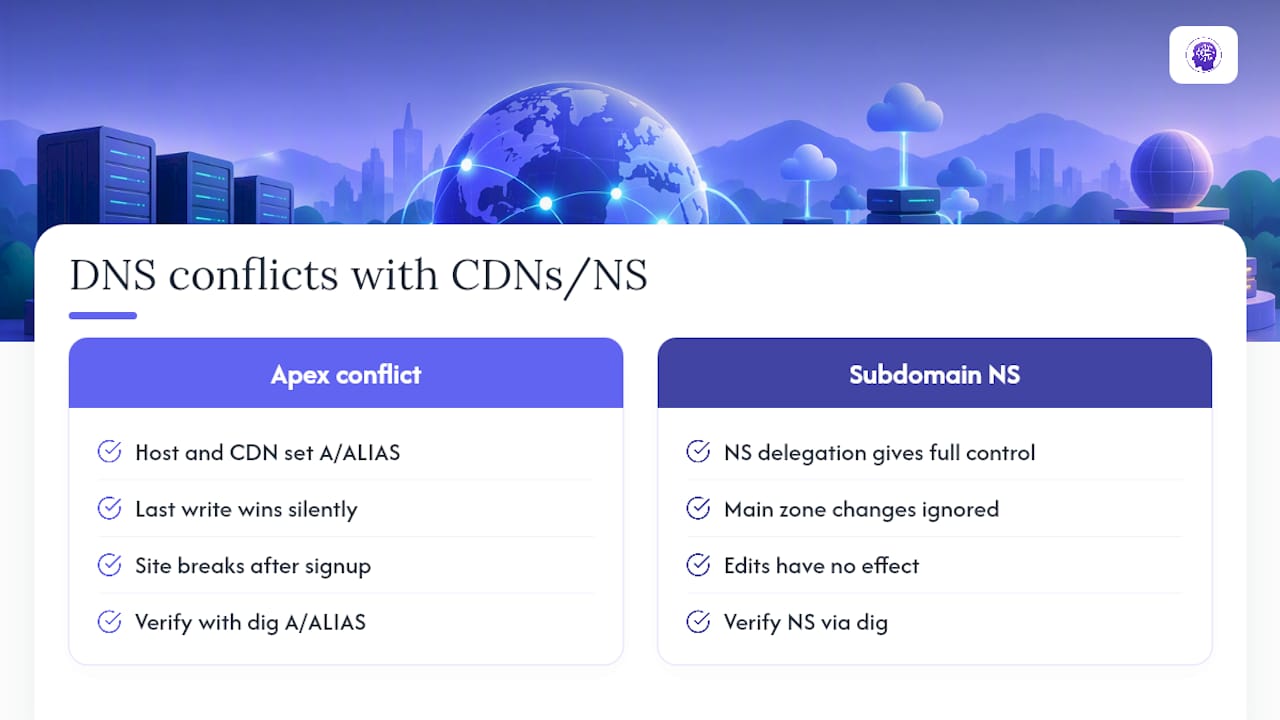
Provider-specific behaviors compound this further. Some DNS hosts synthesize HTTPS or SVCB records automatically, or proxy traffic in a way that hides the real origin IP from a standard dig query. Before adding any third-party service, check what records it asks you to create, then verify with dig that those records are the ones actually being served, not something a caching layer is quietly overriding.
Dynamic DNS: When Your IP Address Won’t Sit Still
Dynamic DNS solves a problem that standard DNS records were never built to handle: a device whose IP address changes without warning. Most home internet connections, and plenty of small office setups, get a new IP address periodically from their ISP. A standard A record with a fixed IP breaks the moment that happens.
A dynamic DNS (DDNS) client runs on your network and automatically updates your A or AAAA record every time your public IP changes, usually within minutes. This matters for a narrow but real set of cases: self-hosted home servers, security camera systems accessed remotely, small NAS setups, or personal VPN endpoints running on residential internet rather than a data center.
It’s worth being clear about who does not need this. If your website lives on a hosting provider, a cloud server, or a platform like WebsitePublisher.ai, your IP address is stable and managed by the host. Dynamic DNS solves a residential-IP problem, not a website-hosting problem, and adding it where you don’t need it just introduces another moving part that can fail.
Setup Patterns and Mistakes We See at WebsitePublisher.ai
Across customer projects, the same two mistakes show up repeatedly: trying to CNAME the apex domain, and enabling a contact form or email feature without ever adding an MX record. Before any launch, our team recommends a fast test routine: check the apex resolves, confirm www redirects correctly, and query mail records if email is involved. If a registrar’s nameserver list looks wrong or won’t update, contact them directly. If records look correct but still resolve incorrectly, keep diagnosing with authoritative queries first.
An Integrated Path: Domain Registration Inside the Site Workflow
Everything above assumes you’re managing DNS by hand across a registrar, a separate DNS host, and whatever platform serves your site. That’s a reasonable way to work, but it’s also where most of the mistakes in this guide come from: three different dashboards, three different places for a record to go stale.

Our platform supports domain registration across various TLDs within the same workflow used to build sites, integrating DNS setup with site creation to minimize separate steps. You describe the site you want in natural language, and domain and DNS configuration happen alongside it rather than as a follow-up chore in a different tool. If you’d rather not juggle a registrar dashboard and a DNS control panel every time you launch something new, check the domain registration options or look at current plan pricing to see whether the integrated flow fits your next project. For teams planning a migration where DNS timing matters, this site migration checklist is a useful companion resource for mapping URLs and protecting rankings during the switch.
Sources
For deeper technical detail, see Cloudflare’s DNS record reference, Google’s Public DNS security docs, and the ISC DNSSEC guide.
- Public DNS security — Google Developers
FAQ
What DNS records do I need for a website?
At minimum you need an A or AAAA record at the apex, NS records matching your registrar, and an SOA record for the zone. Add MX and TXT records only if that domain sends or receives email.
How can I find DNS records for a website?
Run dig example.com A or nslookup example.com from a terminal, or use a web-based DNS lookup tool that shows both authoritative and global resolver answers. Querying the authoritative nameserver directly gives you the most current, uncached result.
Is 8.8.8.8 or 1.1.1.1 better for DNS lookups?
Both are reliable public resolvers (Google and Cloudflare, respectively) and either works fine for everyday troubleshooting. For verifying whether a record change has actually taken effect, query the domain’s authoritative nameserver directly instead of relying on either public resolver’s cache.
Can you give me an example of a DNS record?
A common example is an A record like example.com A <IPv4 address>, which points the domain to a specific IPv4 address. A related example is a CNAME like www.example.com CNAME example.com, which aliases the www subdomain to the root.
Does WebsitePublisher.ai handle DNS setup for me?
WebsitePublisher.ai supports domain registration and integrates domain setup directly into the site creation workflow. Current plan pricing is listed on the pricing page.
Build your site the same way
Describe what you want. Your AI builds and publishes it — with a real backend behind it.
See how it works →