 Website


build website with claude
Small Teams: Ship a Client Site in Under an Hour With WebsitePublisher.ai's Claude
See exact Claude prompt patterns and the step-by-step deploy flow on WebsitePublisher.ai so freelancers and small teams can ship a client site in under an...
You can build, connect, and deploy a live website using an AI-powered builder in a single conversational workflow. You describe the site in plain language, Claude generates the pages and copy, you wire up integrations like payments or lead capture, and you publish. The output is a working site, not a mockup, suitable for users who need a repeatable way to ship client work fast.
TL;DR:
- Building and deploying a site with Claude typically takes under an hour for a one-page site and up to a few hours for multi-page projects, depending on complexity.
- Structuring prompts with clear page and section details significantly reduces revisions and aligns the output more closely with your business goals.
- Over 104 integrations, including payments and email capture, can be added during generation without custom coding, ensuring consistency across client projects.
- To ensure accuracy, verify all factual claims against real business records and thoroughly test forms and payment flows before launch.
- Post-launch edits are straightforward using the browser editor, allowing quick updates to text, images, and components without restarting the AI generation process.
Table of Contents
- How Do You Build a Website With Claude on WebsitePublisher.ai?
- What Should Your Prompts Look Like?
- How Does WebsitePublisher.ai Handle Integrations and Data?
- How Do You Keep Claude’s Output Accurate?
- Deploying and Editing After Launch
- How Long Does It Take, and What Does It Cost?
- Best Practices to Avoid Rework
- Which Projects Benefit Most From the Claude Builder?
- Try the Claude Builder on the platform
- Sources
- FAQ
How Do You Build a Website With Claude on WebsitePublisher.ai?
The workflow has six practical steps. Skipping the prep work is the most common reason a first draft feels generic.
- Gather your inputs first. Have your domain name (or a placeholder), logo and brand colors, a short list of pages ranked by priority, and the integrations you need (Stripe, a booking tool, an email service) ready before you open the builder.
- Write a structured prompt. Tell Claude who the site is for, what pages you need, the tone (professional, playful, technical), and any required calls to action. Vague prompts produce vague sites.
- Generate the first draft. Claude produces the page structure, copy, and layout based on your prompt. This takes minutes, not hours.
- Review against your business goals. Check that the homepage answers “what is this and why should I care” within the first screen, and that navigation matches how customers actually think.
- Connect integrations. Add payment processing, email capture, or booking forms using the built-in integration options rather than custom code.
- Preview and publish. Test every interactive element before the site goes live.
Before you hit publish, run through a short checklist: does every form actually submit, does a test payment complete and show up where it should, and does a signup trigger a real confirmation email? These three checks catch the majority of launch-day problems.
Pro Tip: Draft your page list and integration list in a plain text document before opening the builder. Prompting from a written brief, instead of improvising, cuts revision cycles by roughly half in our team’s experience with client projects.
What Should Your Prompts Look Like?
Claude responds best to prompts that specify structure, not just subject matter. A prompt that says “build me a bakery website” gives Claude too much room to guess. A prompt that says “build a one-page site for a bakery targeting local families, with a hero section, a menu highlights section, an about section, and a contact form” gives it a blueprint.
Three patterns cover most small business needs:
- Lead generation page: Specify the offer, the target audience, one primary call to action, and a contact or booking form. Name the integration you want tied to that form.
- Portfolio site: Specify categories of work, how many projects to feature, and whether you want client testimonials or case study summaries.
- E-commerce landing page: Specify the product category, pricing display format, and the payment integration you plan to connect.
For each type, describe your audience and tone directly in the prompt (“write for busy parents, keep sentences short, avoid jargon”). Structuring content with a clear heading and a 40 to 60 word summary under each section also helps prepare content that’s easier for AI systems to retrieve and reuse later, which matters if you add a chat widget or search feature down the road. Compare the draft Claude returns against your original prompt line by line. If a section is missing or the tone drifted, revise the prompt rather than manually rewriting the output.
How Does WebsitePublisher.ai Handle Integrations and Data?
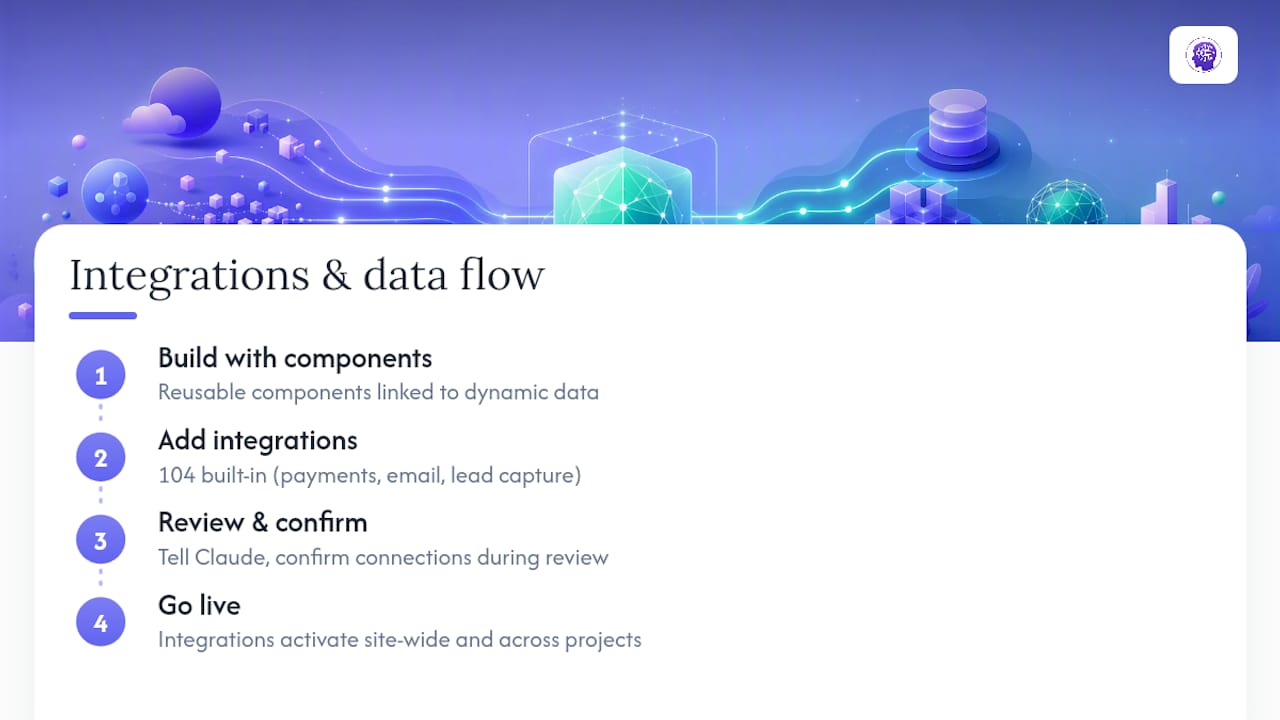
Pages are built from reusable components tied to dynamic data, not static blocks of hardcoded text. Change a price, a testimonial, or a product image in one place and it updates everywhere that component appears, instead of forcing you to hunt through individual pages.
That structure is also why integrations attach cleanly. The platform supports over 104 built-in integrations, covering payments, email, and lead capture, so adding a Stripe checkout or a mailing list signup during generation doesn’t require custom code or a developer handoff. You tell Claude what you need connected, confirm the integration during review, and it’s live with the rest of the site. For agencies running multiple client builds, this consistency matters more than it sounds: a component fixed on one project carries the same fix into the next, which is where a lot of the time savings actually come from.
How Do You Keep Claude’s Output Accurate?
Claude, like any large language model, can produce confident but inaccurate claims if it isn’t grounded in real information. The fix is a technique called retrieval-augmented generation, or RAG, where the model pulls from your actual business content instead of guessing. Modern conversational tools follow a pipeline of intent understanding, retrieval, response generation, and guardrails, and skipping the guardrail step is one of the most common causes of downstream support tickets.
Before launch, run these checks:
- Verify every factual claim on the site (pricing, service areas, credentials) against your actual business records.
- Prioritize your highest-friction pages, like pricing or FAQ, for the closest review since that’s where inaccuracies cost you the most.
- Test forms, payment flows, and confirmation emails end to end, not just in isolation.
Guardrails are the step teams skip most often, and it’s also the step that reduces support tickets the most once you’re live.
Deploying and Editing After Launch
Publishing a site built with the Claude builder follows a straightforward flow: generate, review, connect integrations, preview, then deploy. Once the site is live, edits don’t require reopening a full AI conversation. The browser editor lets you update text, swap images, or adjust a component directly, and because components are reusable, one fix can apply across every page that uses it.
We recommend a simple maintenance cadence: check integrations monthly (especially payment and email connections), review analytics quarterly to spot underperforming pages, and keep a version history habit so you can roll back a change that didn’t work. Small, frequent edits in the browser beat large, infrequent overhauls that risk breaking something that was working fine.
How Long Does It Take, and What Does It Cost?
A one-page lead generation site typically comes together in under an hour of active work, spread across prompting, review, and integration setup. A small multi-page business site takes a few hours across a day or two. A simple e-commerce landing page with payment integration usually adds extra review time for testing checkout flows.
Before committing to a plan, check what’s included: export options, the number of integrations available, and whether the tier supports multiple team seats. Compare the pricing tiers against your actual workload. Agencies running client work benefit from planning handoffs upfront, deciding who owns ongoing edits before the project ships, since that decision shapes which plan tier actually fits.
Best Practices to Avoid Rework
A handful of habits separate a smooth build from a frustrating one.
- Write prompts with explicit structure: name each section, give a rough word count, and state the required call to action.
- Pilot your riskiest page first. Starting with your single highest-friction page, like pricing or checkout, before rolling changes across the whole site limits how much rework a bad draft creates.
- Test every payment and notification email path yourself, using real test transactions, not just a visual check.
Pro Tip: If a generated page misses the mark, revise the prompt with more specific structure before you start manually editing. A tighter prompt usually fixes the problem faster than a page-by-page cleanup.
Which Projects Benefit Most From the Claude Builder?
Across the projects we see move through WebsitePublisher.ai, service businesses, portfolios, and simple e-commerce landing pages convert to this workflow the fastest, because their page structure is predictable and their content changes often. Freelancers use it to turn around client sites in a single session instead of a multi-week build. Agencies tend to combine the AI-generated draft with a designer’s polish pass on the homepage and hero sections, keeping the automated workflow for interior pages where speed matters more than custom flourish.
Try the Claude Builder on the platform
The platform offers a path to a live website without hiring a developer or learning a page builder’s quirks. You describe the site, Claude generates it, you connect the integrations you actually need, and you publish, all in one workflow instead of stitching together separate tools for hosting, forms, and payments.

Getting started takes three steps: open the Claude AI website builder, describe the site you want in plain language, then preview and deploy once you’re satisfied with the draft. If you want to see what’s possible before you commit, browse the portfolio of live sites built on the platform, or check the pricing plans to find the tier that matches your workload. Start your first build today and have a working site to show a client before the day is out.
Sources
The workflow and testing guidance above draw on published implementation research for conversational and AI-assisted web tools, including the conversational maturity model and guardrail pipeline from Innoraft, practical rollout guidance from ChatSpark on preparing content and piloting high-friction pages, and developer notes on embedding AI features into web development workflows.
- AI Chatbots & Conversational Interfaces for Smarter Websites | Innoraft
- Conversational AI for Websites: How Businesses Automate Customer Conversations - The ChatSpark Blog
FAQ
Can I Build a Website With Claude Without Coding?
Yes. WebsitePublisher.ai’s Claude builder generates pages, copy, and layout from a natural-language prompt, and you connect integrations like payments or email through built-in options rather than custom code.
How Long Does It Take to Build a Site With Claude?
A one-page site typically takes under an hour of active work, while a small multi-page business site takes a few hours spread across a day or two.
What Integrations Can I Add During the Build?
WebsitePublisher.ai supports over 104 built-in integrations, including payment processing, email, and lead capture, added directly during site generation.
How Do I Prevent Claude From Generating Inaccurate Content?
Ground the output by verifying factual claims against your real business records, prioritizing high-friction pages like pricing for closer review, and testing forms and payment flows end to end before launch.
Can I Edit the Site After It’s Deployed?
Yes. WebsitePublisher.ai’s browser editor lets you update text, images, and components directly after deployment without reopening a full AI session.
Recommended
- Build Websites with Claude — Claude AI Website Builder
- Build Websites with ChatGPT — ChatGPT AI Website Builder
- AI Website Builder — Build Websites With ChatGPT, Claude & More
- Build Websites with Mistral — Mistral AI Website Builder
Build your site the same way
Describe what you want. Your AI builds and publishes it — with a real backend behind it.
See how it works →